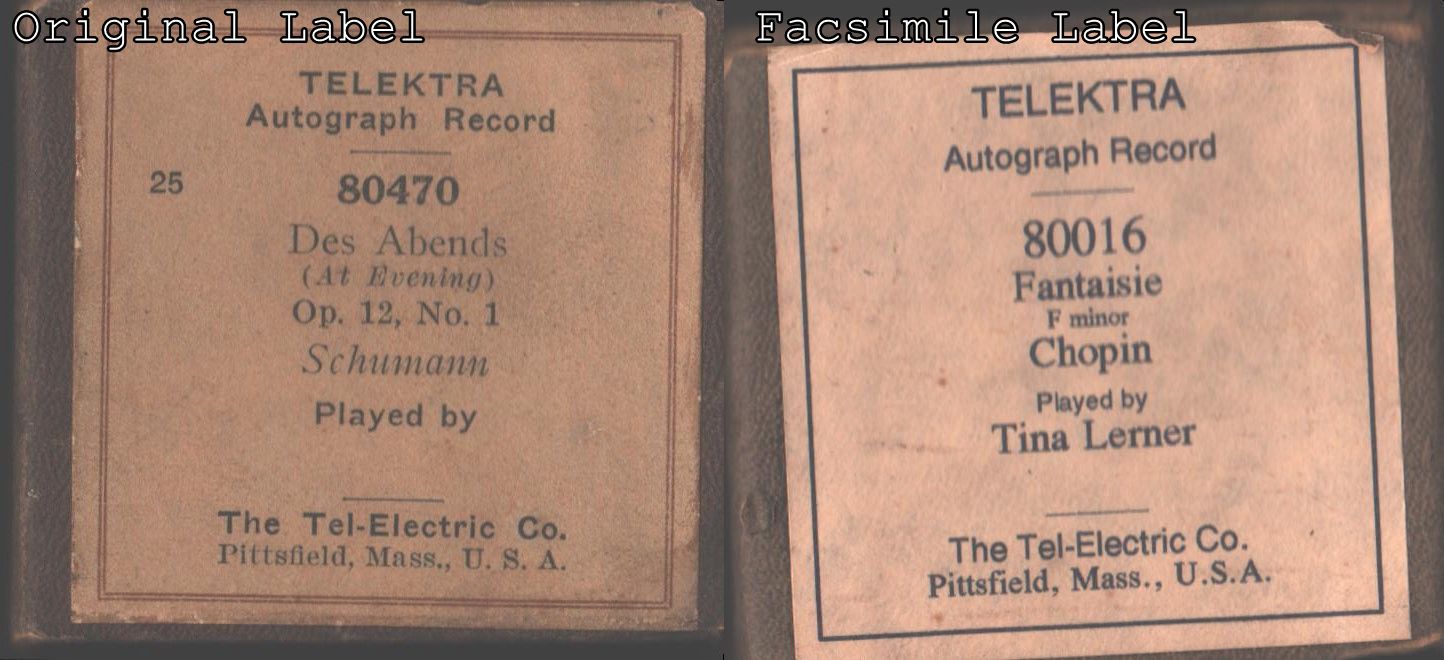
Seek Piano Roll Label Maker Program
By Jase Haysom
Making Pianola roll labels without a graphics package.
Dave Krall wrote in 210109 MMDigest:
> I am looking for something that works with Windows 10 and can
> make labels like in the attached photo -- a free program only
> and easy to use.
It's feasible to use a word processor program to produce a
passable box label. I used the free Open Office word processor
( https://www.openoffice.org/ ) to make the attached label using
Dave's example original label as a model:
https://www.mmdigest.com/Attachments/21/01/09/210109_204536_TelektraLabels2.jpg
 Most of the fiddling about is in making a fair match for the different
fonts. You can use blank (space character only) lines for vertical
spacing -- the font size determines the spacing. Using a PDF file as
an intermediate step allows adjustment of the label size when printing.
Jase Haysom
m.haysom@cartography.id.au.geentroep [delete ".geentroep" to reply]
[ PDF file ready for printing label.
[ https://www.mmdigest.com/Attachments/21/01/16/210116_102024_label_1.pdf
[ Open Office word processor file.
[ https://www.mmdigest.com/Attachments/21/01/16/210116_102024_label_1.odt
[
[ I prefer the "Draw" program from the OpenOffice suite for making labels
[ and other graphic-oriented activities. It is easier to move the objects
[ you create around on the page. --Jody
Most of the fiddling about is in making a fair match for the different
fonts. You can use blank (space character only) lines for vertical
spacing -- the font size determines the spacing. Using a PDF file as
an intermediate step allows adjustment of the label size when printing.
Jase Haysom
m.haysom@cartography.id.au.geentroep [delete ".geentroep" to reply]
[ PDF file ready for printing label.
[ https://www.mmdigest.com/Attachments/21/01/16/210116_102024_label_1.pdf
[ Open Office word processor file.
[ https://www.mmdigest.com/Attachments/21/01/16/210116_102024_label_1.odt
[
[ I prefer the "Draw" program from the OpenOffice suite for making labels
[ and other graphic-oriented activities. It is easier to move the objects
[ you create around on the page. --Jody
|
(Message sent Sat, 16 Jan 2021 02:20:25 -0800 (PST)
, from time zone -0800.)
|
|